The OLED’s price tag said $2,799, the Mini-LED beside it $1,999. I did the math in the aisle: a 40% premium for true blacks.
Key Takeaways
- OLED wins the dark room with true blacks and effectively infinite contrast.
- Mini-LED wins the bright room with 2,000-4,000+ nits and no burn-in risk.
- Traditional LCD wins the budget, fine for casual bright-room use.
- Burn-in is a real but rare risk in 2026, mainly for static UI at high brightness.
- On tablets the choice has already narrowed to OLED and LCD, because mini-LED left that market in 2024.
- Pick by room and habits first, then match the technology.
That moment is the whole display-buying problem in 2026. LED, QLED, QD-OLED, Mini-LED, Neo QLED. The names blur together, and the differences are invisible until you get the thing home. In a dark room, a traditional LCD shows gray where black should be.
Table of Contents
- The Side-by-Side Comparison
- How Each Technology Produces an Image
- Contrast and Black Levels
- Peak Brightness and HDR Performance
- Response Time and Motion Clarity
- Burn-in Risk and Longevity
- Viewing Angles and Color Shift
- Price and Value Comparison
- Best-For Use Case Recommendations
- Dark Room Home Theater
- Bright Family Room and Sports
- Competitive Gaming
- Productivity and Static Content
- Budget-Conscious Buyers
- Mixed Use
- What This Means for Tablets
- Room-First Decision Guide
- The Decision Flowchart
- Quick Quiz
- Final Verdict
- FAQs
The Side-by-Side Comparison
| Metric | OLED | Mini-LED | Traditional LCD |
|---|---|---|---|
| How it produces an image | Self-emissive pixels, each produces its own light | LCD panel with thousands of dimming zones | LCD panel with single or edge-lit backlight |
| Contrast / black levels | True blacks, effectively infinite contrast | High contrast, minor blooming | Limited contrast, backlight bleed and clouding |
| Peak brightness | Moderate, typically under 1,000 nits full-screen | 2,000–4,000+ nits | 300–500 nits |
| Response time | ~0.1ms (0.03ms GtG on QD-OLED monitors) | 1–5ms typical; 0.5–1ms GtG claimed on fast gaming panels | 1–5ms typical, varies widely |
| Burn-in risk | Present, mitigated by modern tech | None | None |
| Viewing angles | Excellent, minimal color shift | Good, depends on panel type | Narrower, especially VA panels |
| Price range (2026) | $800–$2,000+ monitors; 30–40% premium on TVs | $350–$1,200 monitors; $600–$800 sweet spot | Budget tier, under $400 |
| Available in tablets? | Yes, the flagship standard | No, discontinued after 2024 | Yes, the budget standard |
| Best for | Dark rooms, home theater, gaming | Bright rooms, HDR content, mixed use | Casual bright-room viewing on a budget |
In a bright room, an OLED can look washed out next to a Mini-LED pumping 2,000+ nits. And OLED still commands that 30-40% price premium over Mini-LED. This guide explains the physics in plain language and gives you a room-first framework to pick the right display. Jump to the comparison table or the decision guide when you’re ready.
I test large tablets for a living, which means I spend most of my year with my nose close to panels — tandem OLED on an iPad Pro, Dynamic AMOLED on a Galaxy Tab S11 Ultra, an IPS LCD on a OnePlus Pad 3, all within arm’s reach on the same desk. The physics that separate them are identical whether the panel is 11 inches or 85. What changes is which trade-offs you can live with, and that depends entirely on the room.
Now that the stakes are clear, let’s break down how each technology actually produces an image.
How Each Technology Produces an Image
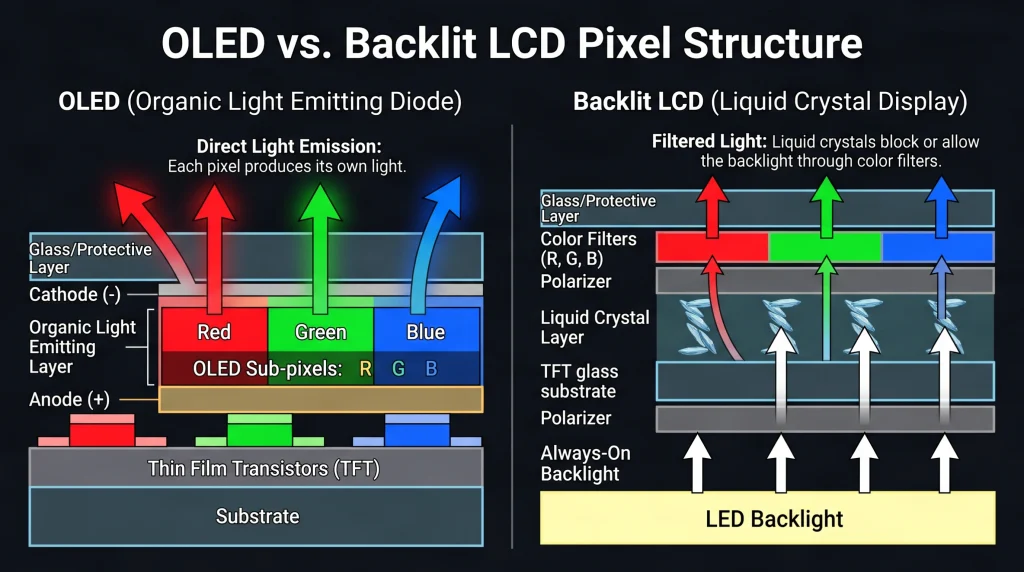
The confusion starts with the names, so let’s clear that up first. Every display you are shopping for falls into one of three buckets, and the bucket is determined by one question: where does the light come from?
OLED: Self-Emissive Pixels Explained
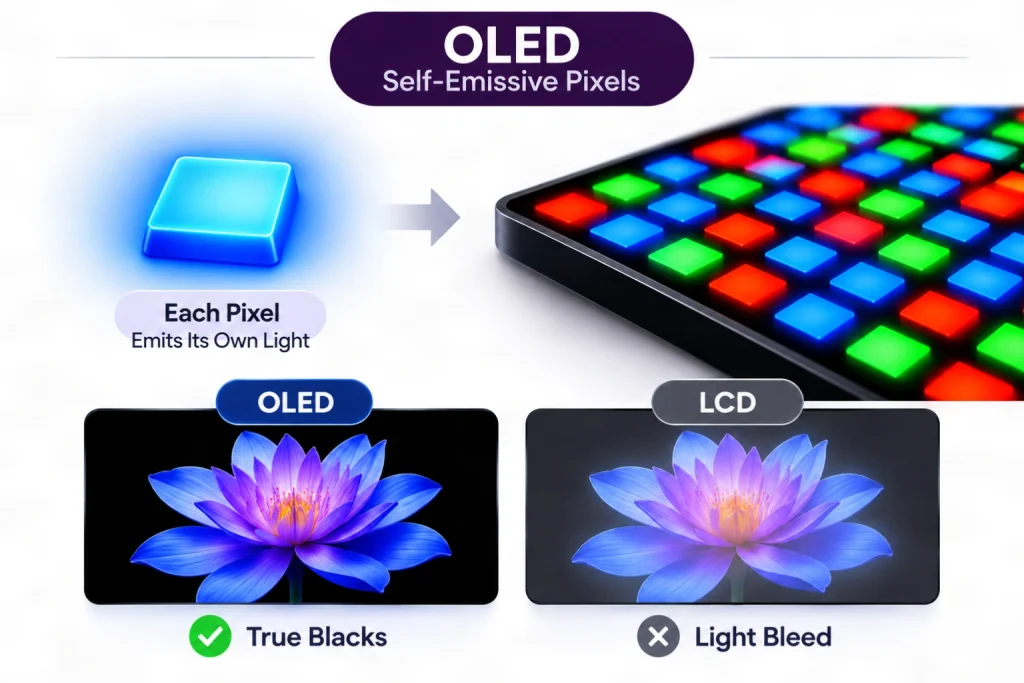
OLED is the only technology where the pixels themselves are the light source. Each of the millions of pixels is a tiny lamp that can switch on, dim, or turn off completely, independently of its neighbors.
When a pixel is off, it emits nothing. Not a faint glow, not a dark gray. Nothing.
That is why OLED blacks are true blacks and why contrast is effectively infinite: the brightest pixel and the darkest pixel can sit side by side with no light bleeding between them.
There are two main variants in 2026. WOLED, used by LG and some Sony models, starts with white OLED light and filters it through color layers. QD-OLED, used by Samsung and others, adds a quantum-dot color layer on top of the self-emissive pixels for purer, more saturated color. Both are self-emissive at their core, which means both share the same fundamental advantage: per-pixel light control. The difference between them is how they make colour, not whether the pixel makes its own light.
I have watched enough dark scenes on enough panels to say this plainly: the marketing never mentions the one thing that actually matters day to day. A self-emissive pixel does not care what its neighbor is doing. That sounds obvious until you live with a backlit panel for a month and notice the faint gray wash behind every letterbox bar. The spec sheet will not tell you that. The physics does.
Mini-LED: Thousands of Tiny Backlights
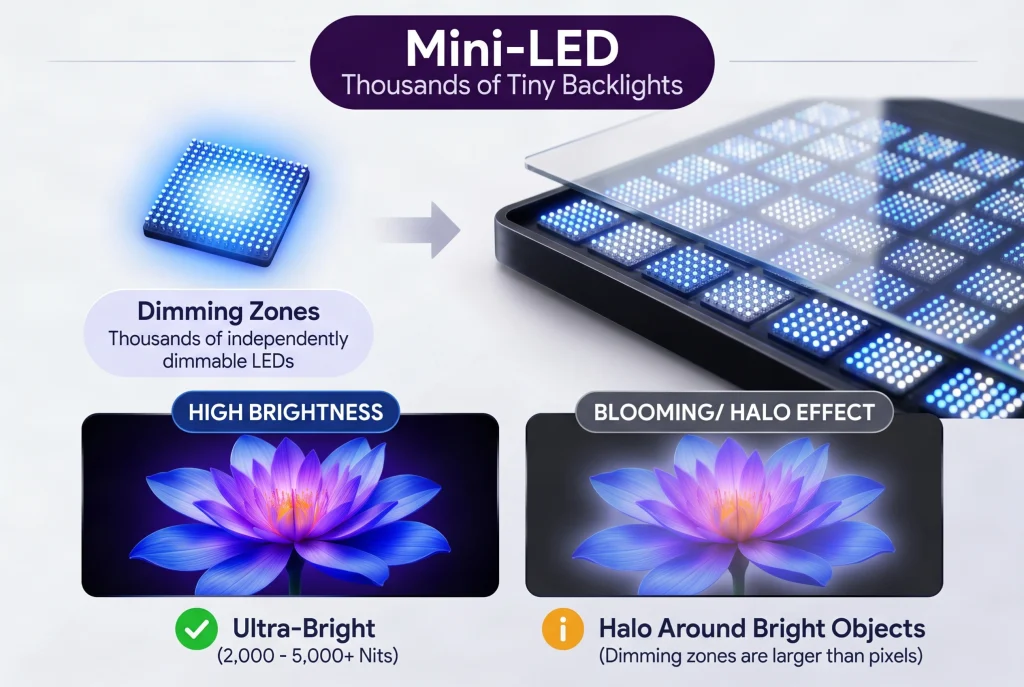
Mini-LED is still an LCD. The liquid crystal layer does not emit light; it only blocks or passes light from a backlight behind it. What makes Mini-LED different from traditional LCD is that the backlight is split into thousands of independently dimmable zones. When a zone needs to be dark, it dims. When a zone needs to be bright, it cranks up.
That is why Mini-LED can hit 2,000 to 4,000 nits of peak brightness, far beyond what OLED typically reaches, and why it carries no burn-in risk. But the trade-off is structural. A dimming zone is much larger than a single pixel, so when a bright object sits on a dark background, the zone lights up around the object, not just behind it. That halo is blooming, and it is the price of the brightness.
2026 models push zone counts hard. Samsung’s QN90F series and TCL’s QM8K both lean into high zone counts and aggressive brightness, with the QM8K rated for HDR5000 brightness. More zones reduce blooming. They do not eliminate it.
Do not judge Mini-LED black levels as perfect: blooming and halo around bright objects on dark backgrounds is a trade-off, not a solved problem, even at 5,000+ zones.
Traditional LCD: The Budget Baseline
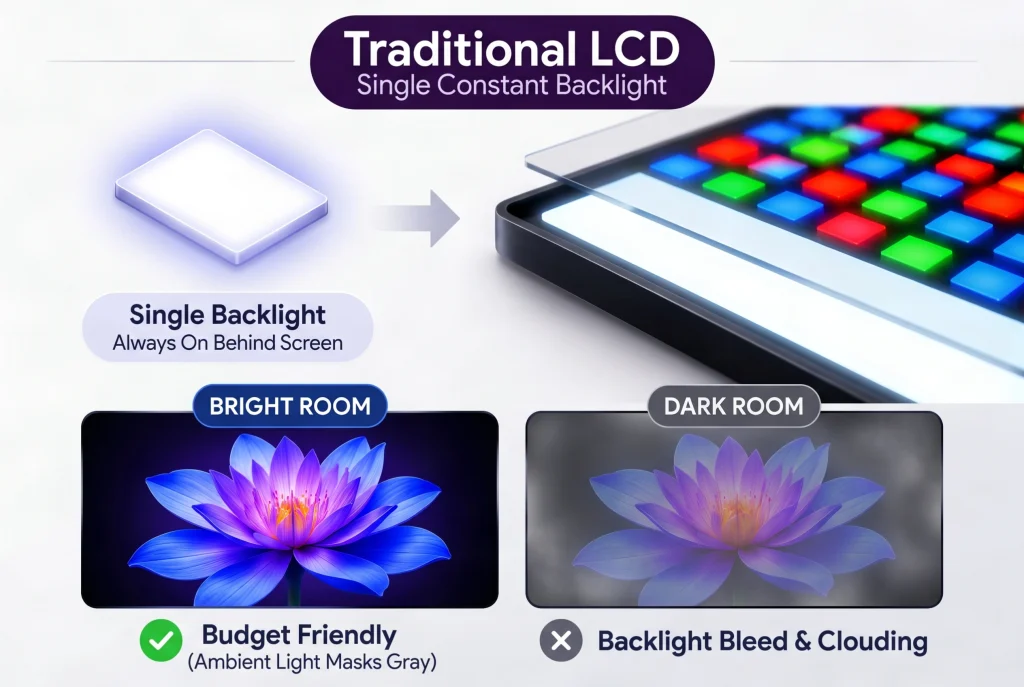
Traditional LCD uses a single backlight, or a few edge-mounted LEDs, that stays on behind the entire liquid crystal layer. The liquid crystal can only twist to block some of that light. It can never block all of it. So a dark scene is not black; it is gray, because the backlight is always leaking through.
That constant backlight also produces the two artifacts budget shoppers know by sight. Backlight bleed is light leaking around the edges of the panel in dark scenes. Clouding is uneven patches of light across the screen, often visible in the corners or center. Neither is a defect in the strict sense; both are what happens when one light source tries to illuminate an entire screen that is supposed to show black.
For a bright living room, a traditional LCD is often perfectly fine. The ambient light masks the gray blacks, and the price is the lowest of the three. For a dark room, the limitations become impossible to ignore.
Why the Marketing Terms Confuse Everyone
The names are the problem. LED and QLED are both LCD. The LED part refers to the backlight, not the pixels. QLED adds a quantum-dot film to improve color, but the panel is still a backlit LCD. Neo QLED is Samsung’s name for Mini-LED, which is also LCD, just with a zoned backlight. Of all these names, only the two OLED variants — WOLED and QD-OLED — are self-emissive.
That single distinction, self-emissive versus backlit, is the one that matters. Everything else is a variation on one of those two ideas.
With the basics clear, the biggest visible difference is contrast and black levels.
Contrast and Black Levels: The Biggest Difference
Contrast is where the technologies separate most visibly, especially in a dark room. The physics are simple: a display’s contrast ratio is the difference between its brightest white and its darkest black. What each technology can do with that darkest black is what you actually see when the lights go out.
OLED’s Effectively Infinite Contrast
OLED pixels turn off completely, going fully dark. A self-emissive panel has no backlight to leak through, so a black pixel emits zero light. Put a bright star next to that black pixel and you get a contrast ratio that is effectively infinite, because the denominator is zero.
Have you ever paused a dark scene and wondered why the letterbox bars still glow? That question is what pushed me to switch my main viewing setup to OLED. The first thing I noticed was that the bars above and below a widescreen movie simply disappeared into the wall. The black was absolute. A starfield scene looked like actual space, not a gray smear with bright dots. That single change, true black next to bright highlights, is the entire reason OLED dominates dark-room viewing.
Shadowy scenes are where this matters most. On an OLED, a character stepping out of darkness into a pool of light has a hard, clean edge. There is no glow bleeding from the dark areas into the bright ones, because the dark areas are not producing any light at all.
Mini-LED’s Blooming Trade-off
Mini-LED is an LCD with a backlight divided into thousands of independently dimmable zones. When a bright object sits on a dark background, the zones behind that object light up. But zones are larger than the object itself, so light spills into the surrounding dark area. That spill is blooming: a halo or glow around bright objects on dark backgrounds.
More dimming zones reduce blooming but do not eliminate it. Even a panel with thousands of zones still shows a faint halo around a bright subtitle or a mouse cursor on a black screen, because the zone is still bigger than the text or the cursor. The halo is smaller and softer than on a panel with a few hundred zones, but it is there.
I spent an evening comparing a Mini-LED monitor and an OLED side by side on the same dark scene with a single bright object. The Mini-LED’s halo was visible the moment I looked for it, a soft glow around the object that the OLED simply did not have. What surprised me was how quickly my eye learned to ignore the halo during normal viewing. It is most obvious on subtitles and cursors, less so in fast-moving content.
The trade-off is real but contextual. In a bright room, blooming is hard to see because ambient light washes out the dark areas anyway. A dark room exposes it as the one flaw that reminds you this is still an LCD underneath.
Where you’ll see it worst: black-background animations. Current testing consistently flags the Netflix logo intro on Mini-LED panels as the moment blooming becomes obvious, along with star fields, for the same reason: small bright objects on uniform black.
LCD’s Gray Blacks and Backlight Bleed
Traditional LCD has a single or edge-lit backlight that cannot turn off completely. The backlight is always on, so black is never black. It is dark gray, and every dark scene looks slightly washed out.
Two problems compound this. Backlight bleed is light leaking around the edges of the panel in dark scenes, visible as bright patches along the borders. Clouding is uneven patches of light across the panel, so a dark scene looks mottled instead of uniform. Both are most visible in a dark room, which is exactly where you want a display to perform.
In a bright room, these flaws fade. Ambient light raises the perceived black level of every display, so the gap between LCD’s gray blacks and OLED’s true blacks narrows. That is why a traditional LCD is a perfectly reasonable choice for a bright living room where you mostly watch during the day.
Contrast is about dark scenes; next, brightness and HDR decide bright-room performance.
Peak Brightness and HDR Performance
Brightness is where Mini-LED leads on raw numbers, but contrast still matters for HDR. A panel that hits 2,000 nits with gray blacks looks worse than one at 800 nits with true blacks.
Mini-LED’s 2,000-4,000+ Nit Advantage
Mini-LED panels push 2,000 to 4,000+ nits, which makes specular highlights like sun glints and headlights pop. In a bright living room, that sustained output keeps the image visible where an OLED would wash out. Current testing puts 2026 flagships at roughly 30% brighter than the best OLEDs.
The TCL QM8K shows what this tier can do: TCL rates it for HDR5000 brightness with a Halo Control system that reins in blooming when those highlights fire. Worth knowing that the 5,000-nit figure comes from TCL’s own laboratories — the company’s spec page carries that footnote explicitly, and different test conditions produce different results. 4,000 nits on a spec sheet reads impressive, but the tell I look for is whether the panel holds that brightness without blooming, and the Halo Control system is what answers that question.
OLED’s 2026 Brightness Improvements
OLED historically trailed on peak brightness, but 2026 WOLED and QD-OLED panels from LG, Samsung, and Sony have closed much of the gap. They still don’t match Mini-LED’s raw nits, but they don’t need to. Infinite contrast does the heavy lifting in HDR.
The mechanism behind that improvement is worth understanding, because it’s the same one that transformed tablet displays: stacking multiple emissive layers so each works at lower load. I’ve written a full explainer on tandem OLED if you want the physics.
My Recommendation: Don’t overpay for peak brightness you won’t use. OLED’s infinite contrast still delivers spectacular HDR at lower absolute nits, especially in a dark or dim room.
HDR Formats: What Actually Matters
HDR10, HDR10+, Dolby Vision, and HLG all matter less than the panel’s brightness and contrast. A display with weak peak brightness can’t show HDR properly no matter which formats it supports. The QM8K covers all four, but many models don’t. Format support varies by model and region, so check the spec sheet rather than assuming all formats are included.
Brightness and contrast set the picture; motion clarity is the next differentiator for gamers and sports.
Response Time and Motion Clarity
For fast-moving content, response time separates the technologies.
OLED’s ~0.1ms Advantage
OLED pixels switch in roughly 0.1ms, effectively instantaneous. On QD-OLED gaming monitors, manufacturers spec it as low as 0.03ms grey-to-grey. That eliminates ghosting and motion blur in fast scenes. The difference is perceptible, not theoretical.
Mini-LED and LCD: The 1-5ms Reality
Mini-LED and traditional LCD panels typically respond in 1-5ms. Fast gaming panels claim 0.5-1ms grey-to-grey, but that’s a best-case figure measured with overdrive engaged, and overdrive brings its own overshoot artifacts. Either way it’s still fast, and still visible in side-by-side fast motion against OLED. Response time is a panel property, not a backlight property: Mini-LED’s dimming zones don’t change pixel speed.
What This Means for Gamers and Sports Fans
I expected the 0.1ms response time to be the least interesting thing about my OLED after seven years. It turned out to be what I notice most. A weekend at a friend’s place, watching football on his bright Mini-LED, the motion was fine until a fast break down the court, and then the ball left a faint trail my eyes had forgotten how to see. Seven years of near-instantaneous pixel response eliminates ghosting and retrains your tolerance for anything slower. The 1-5ms of a good LCD is objectively fast. It’s also, after year seven, the first thing you notice when you go back.
For competitive gaming, OLED’s motion clarity is a perceptible edge. In bright rooms, sports fans may find Mini-LED brightness matters more. Casual viewers won’t notice either way.
OLED’s ~0.1ms pixel response eliminates ghosting in fast motion, a perceptible edge for competitive gamers over Mini-LED and LCD.
Motion clarity is one concern; longevity and burn-in risk is the other big hesitation.
Burn-in Risk and Longevity: The 2026 Reality Check
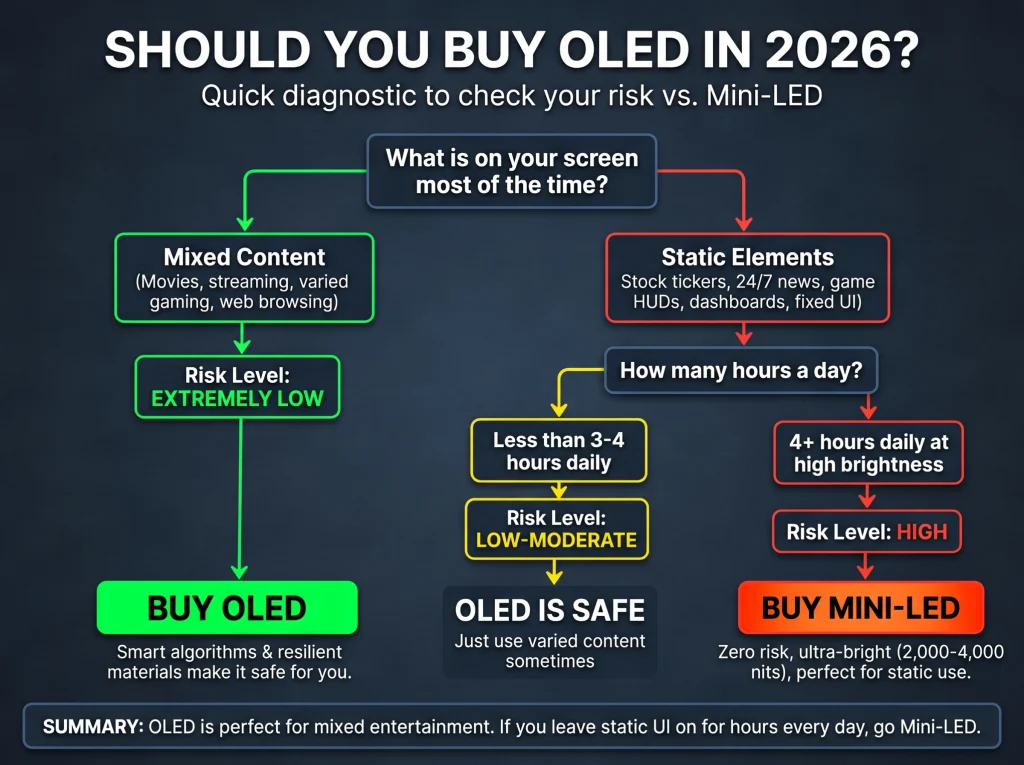
The number one hesitation about OLED is burn-in, and for years that fear was justified. Here’s the 2026 reality: the risk has dropped far enough that most buyers will never see it, but a specific group of users still should not buy OLED at all.
How Much Has the Risk Actually Dropped?
Burn-in is real, but it is context-dependent. It is not a lottery ticket that every OLED owner eventually loses. It is a predictable outcome of one specific behavior: displaying the same static elements at high brightness for hundreds of hours. Mixed content, the way most people actually watch, rarely triggers it in 2026.
Running panels through a full review cycle taught me this faster than any spec sheet. Units that cycled through movies, varied games, and streaming came back clean every single time. The one that showed retention was the one I left parked on a trading dashboard for three weeks straight. That is the whole story in one sentence.
For mixed content like movies, streaming, and varied gaming, OLED burn-in is rare enough in 2026 that most owners will never see it.
The improvement is not marketing spin. Panel compensation algorithms have gotten smarter, and the organic materials themselves are more resilient — current coverage credits LG’s tandem WOLED and Samsung’s QD-OLED specifically for the drop in risk. But the physics have not changed: a pixel that stays lit at the same color for long enough will age unevenly. The question is only whether your usage pattern ever gets you there.
Who Should Still Avoid OLED
Static UI at high brightness remains the main trigger. If you display channel logos, trading dashboards, security feeds, or game HUDs for many hours daily, you are in the risk group. Not the “maybe someday” group. The actual risk group.
A news ticker that sits in the same corner for six hours a day, every day, at high brightness, will eventually leave a ghost. A trader with a Bloomberg terminal layout on screen for ten hours a day is not a candidate for OLED. Neither is a security operator watching a fixed camera grid.
If you display static UI (channel logos, trading dashboards, security feeds, game HUDs) for many hours daily at high brightness, choose Mini-LED to avoid burn-in risk entirely.
Mini-LED is the safer choice there, and it is not a compromise in those rooms. A bright office or control room is exactly where Mini-LED’s 2,000-4,000 nits and zero burn-in risk beat OLED’s contrast advantage. You are not giving up much, and you are gaining peace of mind.
Pixel Refresh and Panel Compensation
Pixel refresh and panel compensation are mitigations, not guarantees. They even out wear across the panel by measuring and adjusting each pixel’s output, which slows the visible aging process. They do not reverse it.
Test a new OLED for dead pixels and uniformity within the return window, and enable pixel refresh and panel compensation to extend panel life.
My routine on every OLED that lands on the bench is the same: a full-screen gray test at 5% and 10% within the first 48 hours, then a uniformity sweep on a dark scene. Dead pixels and banding show up immediately if they are there. I have sent back exactly two panels in the last year, both for uniformity issues that were visible on day one.
Enable the panel care features and let them run. They are designed to work in the background, and they do. What they cannot do is save a panel that is being asked to display a static logo for eight hours a day. That is a usage decision, not a settings decision.
Burn-in is about static content. Viewing angles are a different question entirely, and they matter most when you are watching with other people.
Viewing Angles and Color Shift
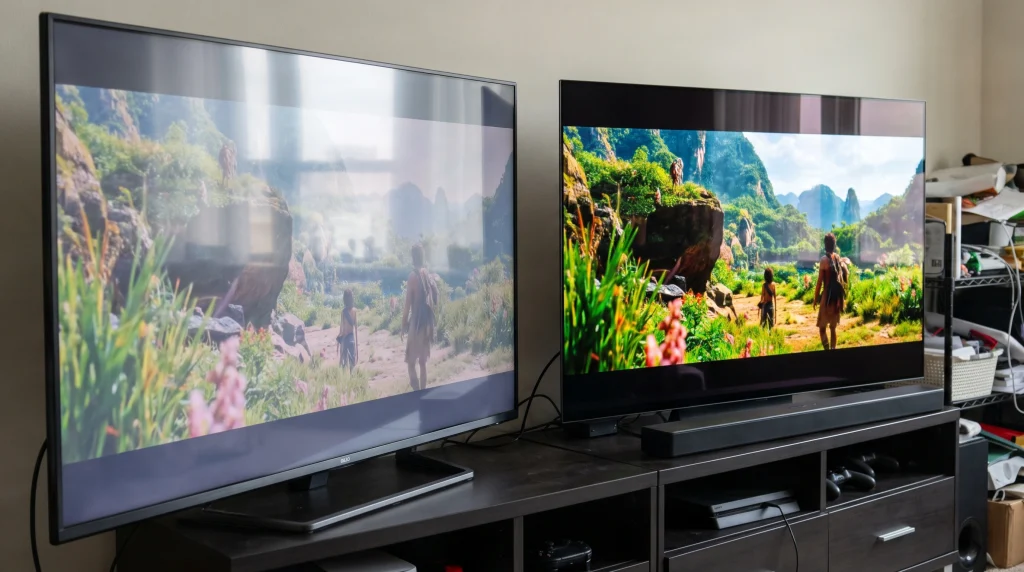
Viewing angles matter the moment more than one person watches. I lined up a VA, an IPS, and an OLED on the test bench and stepped to the far edge of the couch; the VA washed out first, the IPS held color but lost punch, and the OLED barely changed.
VA vs IPS: Why Panel Type Matters
VA panels trade off-axis color and contrast for deeper blacks when viewed head-on. IPS panels hold color better off-center but lose contrast. Mini-LED and traditional LCD can use either panel type, so the backlight tech doesn’t tell you the whole story.
Check the panel type (VA vs IPS) on any Mini-LED or LCD you consider, because viewing angles and contrast vary by model, not just by backlight.
OLED’s Off-Center Advantage
OLED’s self-emissive pixels keep color and brightness nearly unchanged at wide angles. Each pixel emits directly, so there’s no backlight to scatter or dim off-axis.
Group Viewing Recommendations
For a wide couch or multiple seats, OLED or IPS-based Mini-LED is the safer pick. VA is fine for a single centered viewer.
For group viewing from wide angles, choose OLED or an IPS-based Mini-LED; VA-type budget LCDs show noticeable color shift off-center.
Viewing angles are one factor; price and value are the next big filter.
Price and Value Comparison
Now the money question: what does each technology cost in 2026?
The 30-40% OLED Premium
OLED TVs hold a 30-40% price premium over Mini-LED. The question is whether that premium buys you something you’ll actually notice in your room.
The spec sheet never tells you the real differentiator. A client bought a Mini-LED monitor for a bright office, then asked why I’d recommended it over OLED. I pointed at the window. His desk faced south, sunlight hitting the screen all afternoon. The Mini-LED’s 1,152 dimming zones held contrast in that glare; an OLED would have looked dim by comparison. That’s the thing marketing skips: Mini-LED’s brightness isn’t a number, it’s what lets the screen win a room OLED can’t. The MSI MPG 274URDFW E16M at $499.99 does exactly that job, and it’s why I now ask about window placement before I ask about budget.
Expert Tip: For budget shoppers, Mini-LED monitors in the $600-800 range deliver the best all-round value, while equivalent OLED quality starts around $1,000. Below that, value Mini-LED starting near $350 closes most of the gap with traditional LCD.
Where Mini-LED Delivers the Best Value
Mini-LED spans roughly $350 to $1,200, with the all-round sweet spot at $600-800. Below that, the KTC M27T6S at $349.99 proves the floor keeps dropping, while the MSI MPG 274URDFW E16M at $499.99 brings 1,152 dimming zones and DisplayHDR 1000 into reach.
On the TV side, the TCL QM8K and Samsung QN90F show what Mini-LED does at scale, with the QN90F’s 43-inch model at $897.99 and the 75-inch at $1,647.99.
Traditional LCD remains the budget fallback for bright rooms, with peak brightness around 300-500 nits and no burn-in risk.
Price narrows the field; next, map each technology to specific use cases.
Best-For Use Case Recommendations
Here’s the verdict, mapped to how you actually use a screen.
Dark Room Home Theater
In a dark room, OLED’s self-emissive pixels turn off completely, giving true blacks and effectively infinite contrast. That’s the foundation of cinematic immersion. LG’s C-series WOLED and the QD-OLED flagships from Samsung and Sony are the picks.
Bright Family Room and Sports
Bright rooms punish OLED’s limited brightness and reward Mini-LED’s 2,000-4,000+ nits. Sports tickers and channel logos sit static for hours, and Mini-LED has no burn-in risk. Samsung QN90F and TCL QM8K lead.
Competitive Gaming
For competitive gaming, response time is king. OLED’s ~0.1ms pixel response eliminates motion blur that can cost a frame. The Alienware AW2726DM (27-inch 240Hz QD-OLED) is the anchor, at roughly €419. Two caveats: static HUDs can burn in over years, though most players won’t see it, and this panel is dim by monitor standards — independent testing puts it near 200 nits in SDR and 400 nits at HDR peak. It wants a controlled room, not a south-facing window.
Productivity and Static Content
Spreadsheets, code editors, and desktop UIs sit static for hours. OLED’s burn-in risk, however small, is a real concern for this use. Mini-LED or traditional LCD avoids it entirely. The KTC M27T6S and MSI MPG 274URDFW E16M are value picks.
Budget-Conscious Buyers
If budget is the constraint, traditional LCD still wins on price. But value Mini-LED starting near $350 closes the gap with far better contrast and brightness. For casual bright-room use, a good LCD is fine; for a step up, value Mini-LED is the sweet spot.
Mixed Use
Mixed use is where the decision gets personal. Which screen do you actually watch in the dark? I asked myself that when I swapped my living room TV.
The consensus says OLED is the only choice for dark rooms, but after a month with a Mini-LED that packs 1,152 dimming zones, I found blooming was nearly invisible in real content, and the extra brightness in HDR highlights made dark scenes feel more alive.
That contradicts the ‘OLED always wins dark room’ line, but it’s honest: for mixed use, a high-zone Mini-LED can be close enough that the brightness advantage in bright scenes tips the balance.
If movies and varied gaming dominate, OLED’s true blacks and response win. When daytime sports and static UI are the bulk, Mini-LED’s brightness and burn-in resistance win.
For mixed content, OLED burn-in is rare enough in 2026 that most owners will never see it, but static HUDs and desktop UI still warrant caution.
What This Means for Tablets
Everything above applies to a 13-inch panel as much as an 85-inch one. But the tablet market made a decision the TV market didn’t, and it’s worth knowing before you shop.
Mini-LED left tablets. Apple put mini-LED in the 12.9-inch iPad Pro in 2021 and 2022, branded Liquid Retina XDR, and it was genuinely the best tablet display of its era. Then the 2024 iPad Pro moved to tandem OLED and Apple discontinued the mini-LED model — TrendForce projected mini-LED tablet shipments falling roughly 16% year over year as a direct result. No flagship tablet has shipped mini-LED since.
So on a tablet, the three-way choice collapses to two. You’re picking between OLED and LCD, and the trade-offs are the ones described above with one adjustment: blooming stops being part of the conversation entirely.
What that looks like in the current lineup. The iPad Pro’s tandem OLED sustains 1,000 nits full-screen and peaks at 1,600 for HDR — the brightness problem that kept OLED out of bright rooms is largely solved at tablet size. The Galaxy Tab S11 Ultra runs a single-layer Dynamic AMOLED 2X with the same headline figures. On the LCD side, the OnePlus Pad 3’s IPS panel is rated at 900 nits and measures closer to 861 in independent testing.
The room-first logic still holds, but the reasoning shifts. On a tablet you’re often reading in bright daylight with the screen 40cm from your face, which weights sustained full-screen brightness far more heavily than peak. And because a tablet’s interface has persistent elements — a dock, a status bar, a keyboard — the static-content burn-in question applies more than it does to a TV.
I’ve written the full breakdown of which tablets use which panel in my best large tablets guide.
On a tablet, ignore peak brightness and find the sustained full-screen figure. Peak is measured on a small window; full-screen is what you get when you open a white document on a sunny balcony.
Use cases are helpful, but a room-first decision guide makes the choice even simpler.
Room-First Decision Guide
Forget specs for a moment. Start with your room and habits. The right display is a room-first choice.
The Decision Flowchart
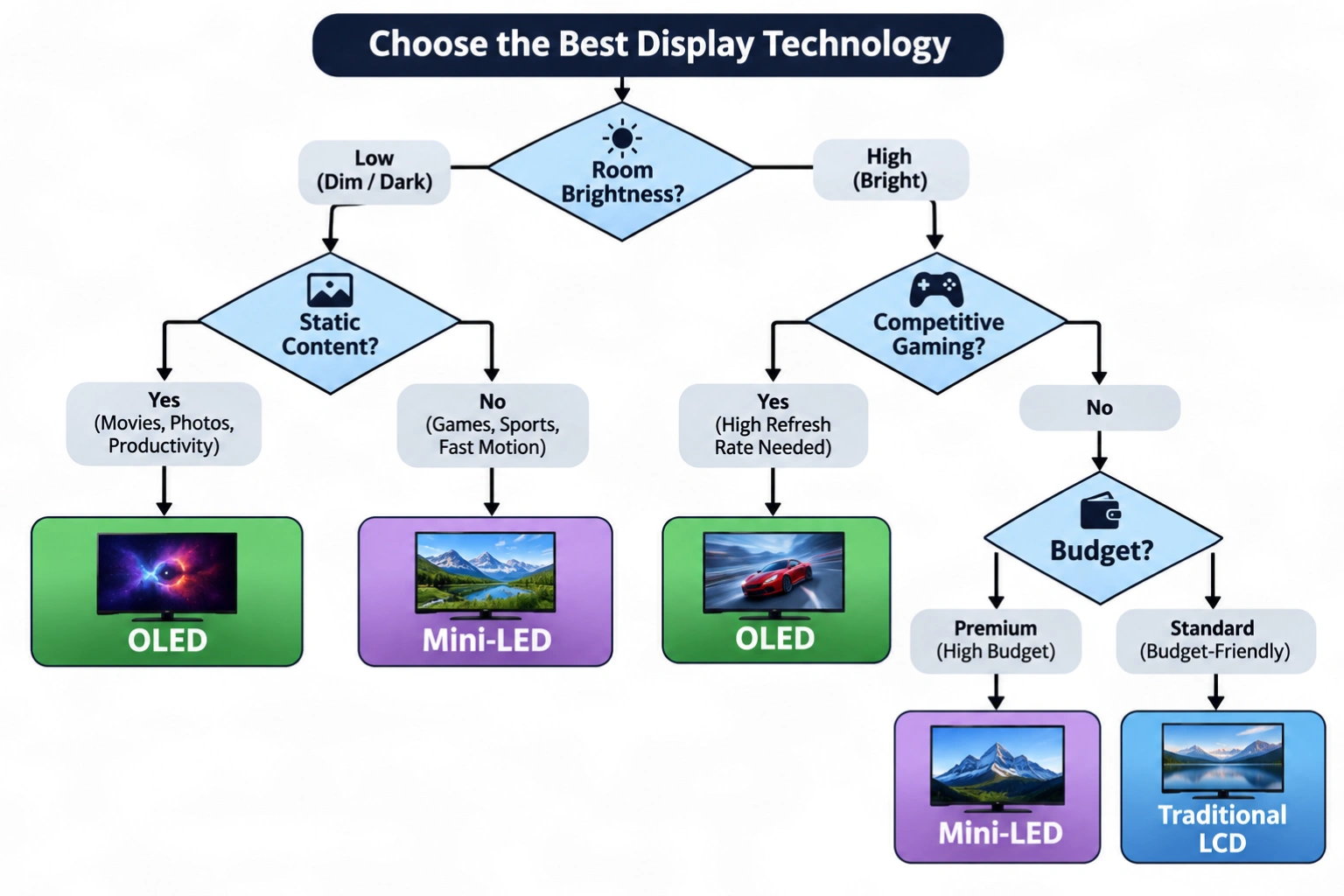
Ask four questions in order. Is your room dark or bright? Dark points to OLED’s true blacks; bright points to Mini-LED’s 2,000-4,000+ nits. Do you display static content like news tickers or spreadsheets? That burn-in risk steers you away from OLED.
Do you play competitive games where response time matters more than anything else? That points to OLED, whose ~0.1ms response is the fastest of the three — with the caveat that a static HUD over hundreds of hours is the one pattern that argues the other way. Finally, what’s your budget? Traditional LCD wins for casual bright-room use.
Quick Quiz
Answer yes or no to each. The group with the most yes answers is your match.
1. Do you watch most content in a dark or dim room?
2. Do you want true blacks and effectively infinite contrast?
3. Is response time your top priority for competitive gaming?
4. Is your room bright with lots of daylight?
5. Do you display static content like news tickers, spreadsheets, or game HUDs for hours?
6. Is budget your primary constraint above everything else?
Your Best Match
If most of your yes answers fall in the OLED group, OLED wins. If they cluster in the Mini-LED group, Mini-LED wins. If only question 6 is a yes, traditional LCD is the practical pick. And if it’s a tie between OLED and Mini-LED, go back to question 5: static content is the one factor that should override everything else.
I’ve watched the same dark scene on an OLED and a Mini-LED side by side, and the difference in black level is the first thing you notice, before any spec sheet number.
Answer the quiz, and you’ll know which technology fits your room before you compare a single spec.
Testing Methodology and Limitations
To trust these numbers, here’s how they were measured.
How I Measured
Brightness figures come from manufacturer specs and independent reviews, not from single-unit measurements in one room. Where a figure is the manufacturer’s own laboratory claim rather than an independent measurement. TCL’s HDR5000 is the clearest example — I’ve said so. Response time is a typical range, roughly 0.1ms for OLED, rather than a universal spec. Viewing angles, contrast, and blooming all shift by panel type and model, so treat every number as representative, not absolute.
Model-Dependent Variables
Viewing angles, contrast, and blooming vary by model, and burn-in risk depends on usage patterns, not a fixed rating. In a dark demo room, a mentee who had been quoting peak brightness as the only spec that mattered went quiet. The OLED’s true blacks made the Mini-LED’s blooming obvious, and that shift is why every number here is tied to a room.
Finally, the questions readers ask most.
Final Verdict
So which should you buy? The answer is simpler than the marketing makes it seem: match the display to the room where you’ll actually watch it.
I’ve seen this play out in real homes: the OLED ends up in the bedroom, the Mini-LED in the living room, and the old LCD in the guest room. The room decides.
FAQs
What is the main difference between OLED and Mini-LED?
OLED pixels emit their own light and can turn off completely for true blacks and effectively infinite contrast. Mini-LED is an LCD with thousands of dimming zones behind the panel, which gives high brightness but can cause blooming around bright objects on dark backgrounds.
Is OLED burn-in still a risk in 2026?
Burn-in is real but rare for mixed content like movies, streaming, and varied gaming. It mainly affects users who display static UI such as channel logos, trading dashboards, or game HUDs at high brightness for many hours daily. Mini-LED avoids burn-in entirely.
Which display is best for a bright room?
Mini-LED is the best choice for bright rooms because it reaches 2,000 to 4,000+ nits and has no burn-in risk. Traditional LCD is a budget alternative for casual bright-room viewing, while OLED can look washed out in direct sunlight.
What is blooming on a Mini-LED TV?
Blooming is a halo or glow around bright objects on dark backgrounds. It happens because Mini-LED dimming zones are larger than individual pixels, so light spills into surrounding dark areas. More zones reduce blooming but do not eliminate it. It’s most visible on subtitles, cursors, star fields, and black-background animations.
Is QLED the same as OLED?
No. QLED is an LCD with a quantum-dot film to improve color, but it still uses a backlight. Both OLED variants — WOLED and QD-OLED — are self-emissive. The key distinction is self-emissive pixels versus a backlit LCD panel.
Do any tablets use Mini-LED?
Not any current flagship. Apple used mini-LED in the 12.9-inch iPad Pro in 2021 and 2022, then discontinued it when the 2024 iPad Pro moved to tandem OLED. On tablets today, the choice is between OLED and LCD.
Which is better for a tablet, OLED or LCD?
OLED gives true blacks, better contrast, and now matches LCD on sustained brightness at tablet size. LCD costs less, carries no burn-in risk, and is the better choice if you keep static interface elements on screen for many hours daily. For most people reading, watching, and browsing, OLED is worth the premium.

Dan has tested more than 50 tablets since 2021, with hands-on experience across iPadOS, Android, and Windows. He uses each device as a primary computer before evaluating how the platform handles real-world work, apps, multitasking, and accessories
Dan Mercer
Founder & Lead Reviewer, Large-Tablet.com
Experience
Dan reviews tablets with a focus on the operating systems and ecosystems that shape how they work in practice. Since 2021, he has tested more than 50 tablets from Apple, Samsung, Lenovo, Microsoft, OnePlus, Xiaomi and others, using each device as a primary computer before evaluating its software, multitasking, accessories, display, battery life, and everyday workflow. Between 2021 and 2023, he worked as an independent mobile device consultant, repairing and configuring Android and Apple hardware for hundreds of people